Send RCS Online

Web Interface for
RCS & SMS

Send messages directly from your browser. Create campaigns, manage contacts, engage in real-time conversations and analyse results. No coding required.

Features

Everything in one platform

The SendRCS web interface provides all the tools you need for professional messaging. From contact management to campaign analytics.

Dashboard

All key metrics at a glance: active campaigns, contacts, account balance and today's events.

Send Messages

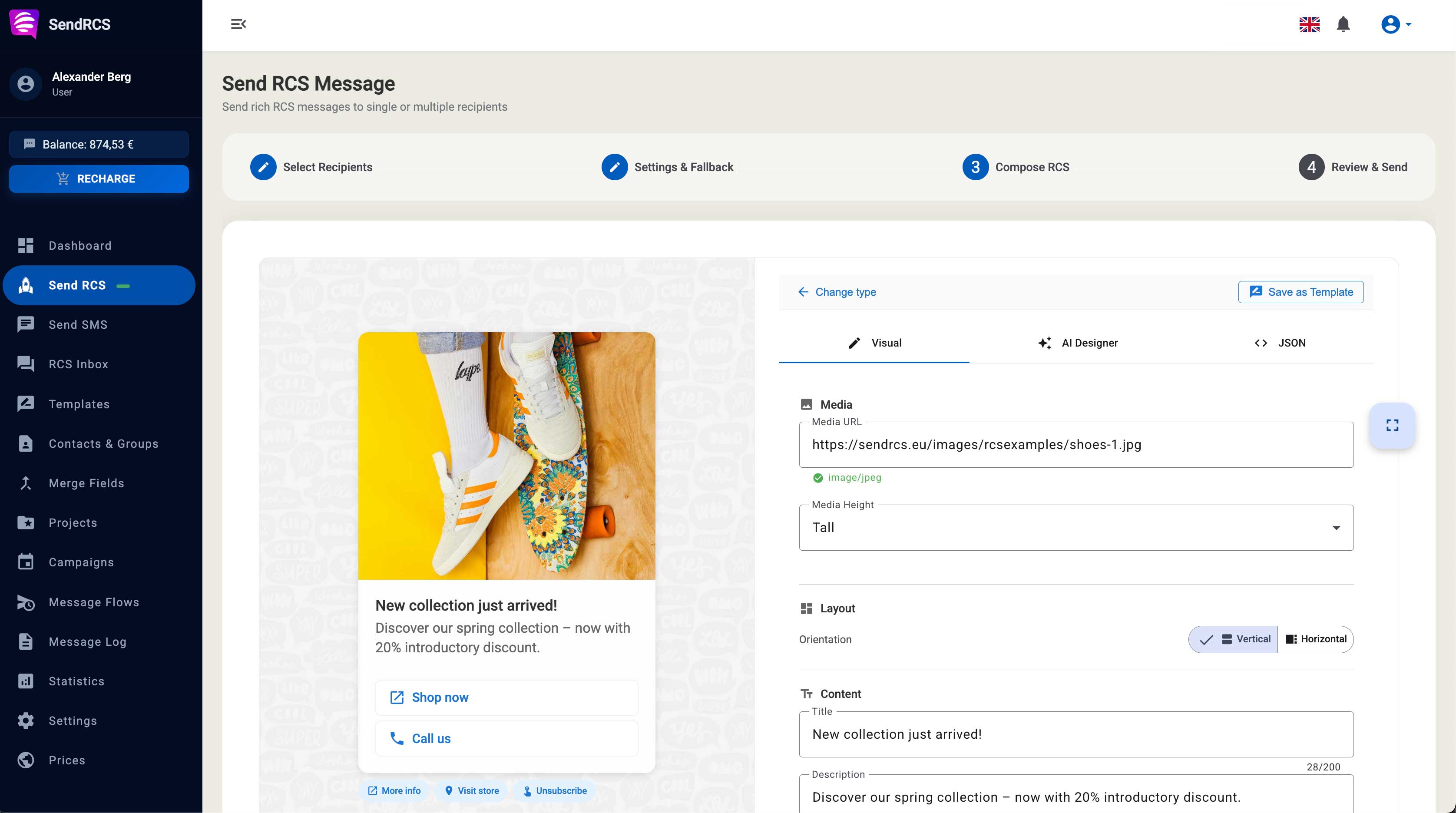
Step-by-step wizard for SMS and RCS. Select recipients from contacts, groups or enter manually.

RCS Inbox

Real-time two-way conversations with your customers. Unread messages, full threads.

Message Templates

Reusable templates for SMS and RCS: text, rich cards, carousels and media messages.

Contacts & Groups

Contact management with custom fields, groups, CSV import and bulk operations.

Campaigns

Scheduled message sending with event mode, confirmation links and detailed reporting.
Scheduled sending
Schedule messages for the optimal time
Event confirmations
Yes / Maybe / No with tracking
Campaign reports
Detailed statistics per campaign
Campaigns

Scheduled Message Sending

Create SMS and RCS campaigns with advanced scheduling options. Organise campaigns into projects and keep track of everything.

  • Scheduled sending for optimal timing
  • Event mode with confirmation links (Yes/Maybe/No)
  • Project-based organisation for better overview
  • Reminders and notifications setup
Real-time

Two-Way RCS Conversations

Have real conversations with your customers. The RCS Inbox shows all conversations in real time with read receipts and instant delivery.

  • Real-time delivery of messages
  • Unread indicators for new messages
  • Full thread view for context
  • Connection status for live monitoring
C
Customer
Online

Hello, I have a question about my order...

14:32

Happy to help! What would you like to know?

14:33
Management

Contacts & Templates

Organise your contacts and create reusable message templates for consistent communication.

Contact Management

  • Custom fields for individual data
  • Groups for segmentation
  • CSV import with column mapping
  • Bulk operations (groups, delete, send)

Message Templates

  • SMS and RCS formats
  • Rich cards, carousels, media
  • Filter by type and category
  • Use in campaigns and flows
12,847
Messages this month
98.2%
Delivered
89%
Read
34%
Clicked
Statistics

Detailed Analytics

Understand how your messages perform. From delivery rates to click rates, the dashboard provides all the metrics you need for optimisation.

  • Date range filters for flexible analysis
  • Campaign statistics in detail
  • Message Log with export function (CSV/Excel)
  • Visual charts for quick overview
More Features

Everything for Your Business

Merge Fields

Personalise messages with dynamic placeholders.

Opt-Out System

GDPR-compliant unsubscribe links with customisable landing page.

Team Management

Manage sub-users with individual permissions.

Webhooks

Forward events to your systems.

FAQ

Sending RCS online, answered

Do I need technical skills to send RCS online?

No. SendRCS is a web interface you use straight from your browser. A step-by-step wizard guides you through selecting recipients from contacts or groups, or entering them manually, and sending SMS or RCS - no coding required. Developers can also use the REST API or the MCP connector for AI assistants, but neither is needed to send online.

Which message types can I send from the web interface?

Both SMS and RCS. For RCS you can send text messages, Rich Cards with images and buttons, carousels and media messages. Reusable templates let you save any of these formats and use them again in campaigns and flows.

Can I schedule messages and campaigns?

Yes. Schedule SMS and RCS campaigns for the optimal time, organise them into projects and set up reminders and notifications. Event mode adds confirmation links so recipients can answer Yes, Maybe or No, with tracking of every response.

Can I receive and answer replies online?

Yes. The RCS Inbox shows all two-way conversations in real time, with read receipts, unread indicators and the full thread for context. You reply directly in the browser.

How do I add contacts and personalise messages?

Import contacts from a CSV file with column mapping, add custom fields for individual data and organise contacts into groups for segmentation. Bulk operations let you move, delete or message many contacts at once. Dynamic placeholders insert each recipient's data, such as their name, into the message.

What happens if a recipient cannot receive RCS?

You can enable optional SMS fallback, so recipients whose phone or network does not support RCS automatically receive the message as an SMS. If you only want to send SMS, use the SMS Gateway from the same web interface.

Can I track how my campaigns perform?

Yes. The dashboard shows delivery rates, click rates and detailed statistics per campaign, with date range filters and visual charts. The message log can be exported to CSV or Excel for your own analysis.

Ready to get started?

Create your account and send your first RCS message in minutes.

  • No subscription
  • No commitment
  • Pay as you go
  • Free trial